
Browse Our Knowledge Base
AIS PDF authentication error
Overview
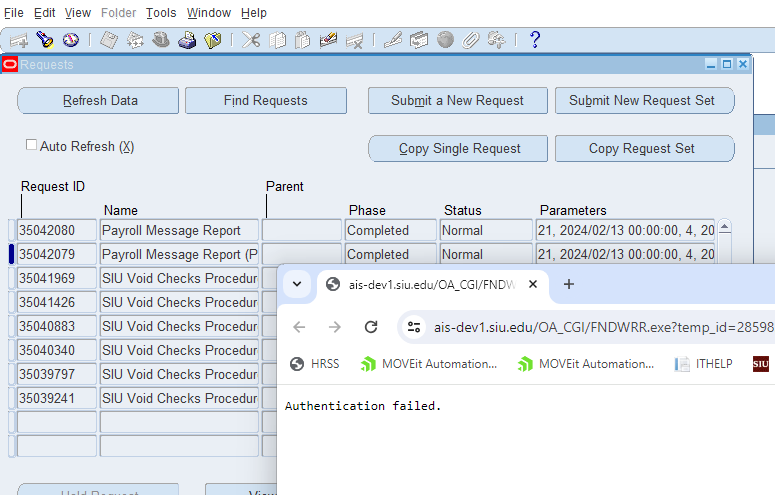
When attempting to view AIS request output formatted as .pdf (like W-2 for example), the following error occurs.
ERROR
———————–
Authentication failed.
Cause
This error is typically due to a browser setting in Google Chrome. Follow the steps below to turn off the ‘Adobe Acrobat: PDF edit, convert, sign tools’ Chrome extension.
Solution:
1. In the upper right corner of your browser window, click on the icon that looks like a puzzle piece. This will show a list of Extensions in use.
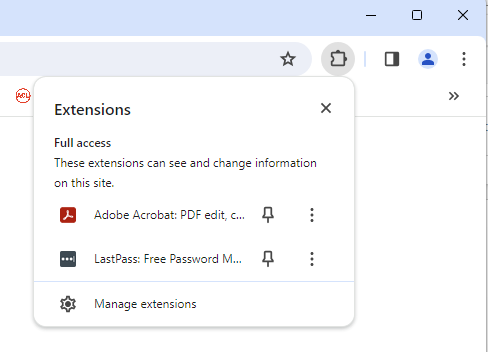
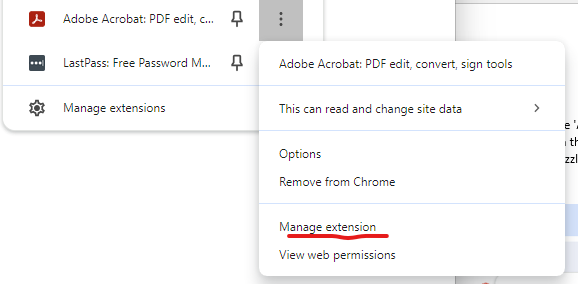
2. Click on the three vertical dots next to the Adobe Acrobat: PDF edit, convert, & sign tools Extension.
3. Select Manage Extension.
3. Click on the switch to the right of the on/off text. When you click the switch, the text should change to “Off” as shown below.
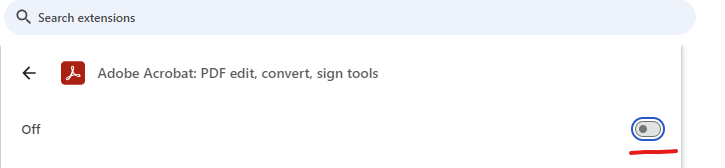
Chrome will then use its default Adobe pdf output Viewer. Your report should open now.