
Browse Our Knowledge Base
Departmental ID or Out-of-band (OOB) Network ID Account
How to Request a Departmental ID
In order to request a departmental ID you will need to fill out the Network ID Account Request form here.
Click the link to open the request form
Once you’ve opened the Network ID Account Request form you will see a dropdown menu with 3 options.
Create an account
Modify an account
Delete an account
Select Create an account

From this menu you will need to choose who will manage the account and enter the SIU.EDU email address for them.
If you would like an email address for this account, be sure to check the box and enter in your requested email address.
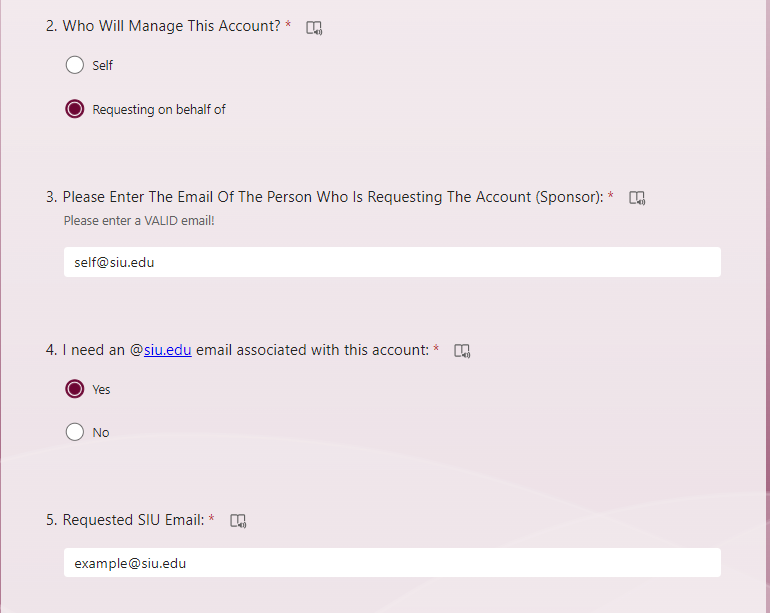
Enter the purpose of the account and select I need an account for department use [Departmental ID]
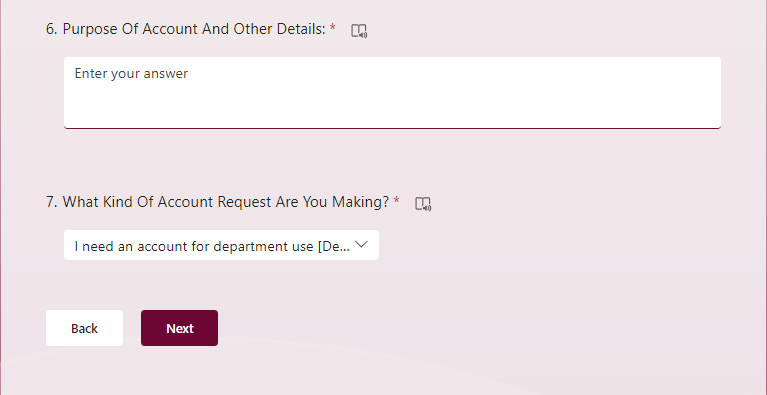
Enter the account description, the display name you want (how it will appear when searched in Microsoft 365) and the associated department.
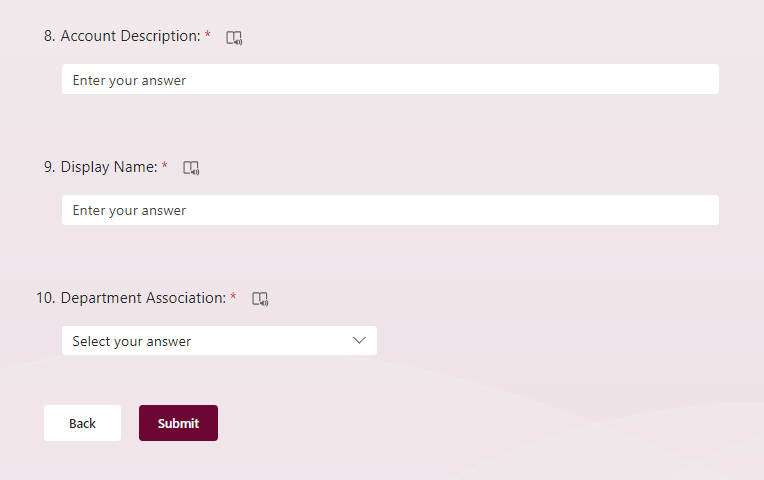
When you’ve finished filling out the form, click submit at the bottom of the page.
I Want to Use a Departmental ID, but it is Deprovisioned
If the departmental ID you would like to use is deprovisioned, you can use this form linked above to fix this issue. You will select “Modify an Account”, enter in the network ID of the account, and in the comments field list that you need access to this deprovisioned account.
My Departmental Account is Unclaimed and I am Unable to Claim It
Departmental accounts are often left unclaimed since they do not usually have an entry for the first and last name fields. Leaving these accounts unclaimed does not interfere with the functionality of the account.
I have a Departmental Id but how do I change the password?
As the owner of a Departmental Id, you can sign into http://netid.siu.edu with your own account, select user lookup, and search for the Id in question. You can select “manage accounts” from the drop down menu, and then change the password on the Id.
For more detailed instructions to changing Departmental Id passwords, please see our guide here: https://oitkb.siu.edu/knowledge-base/how-to-change-department-id-password/
I have an account I no longer need, can I delete it?
Yes, by navigating to the Network ID Account request form and selecting Delete an Account, you can submit a request for deletion.
I need a local administrator account for a computer, how can I request this?
You will need permission from your supervisor before being granted local admin access. Once permission is granted, please use this guide to request your local administrator account: https://oitkb.siu.edu/knowledge-base/setting-up-a-network-id-account-for-a-local-administrator/