
Browse Our Knowledge Base
Deleting Contacts in Outlook (Microsoft 365)
Overview
Follow the steps below to remove a contact from your Outlook contacts. Once deleted, the contact will also be removed from your Microsoft Teams contact list.
Step-by-Step Instructions
1. Sign in to your Microsoft 365 account at office.siu.edu
2. In the left navigation pane, select the People icon to view your contacts.

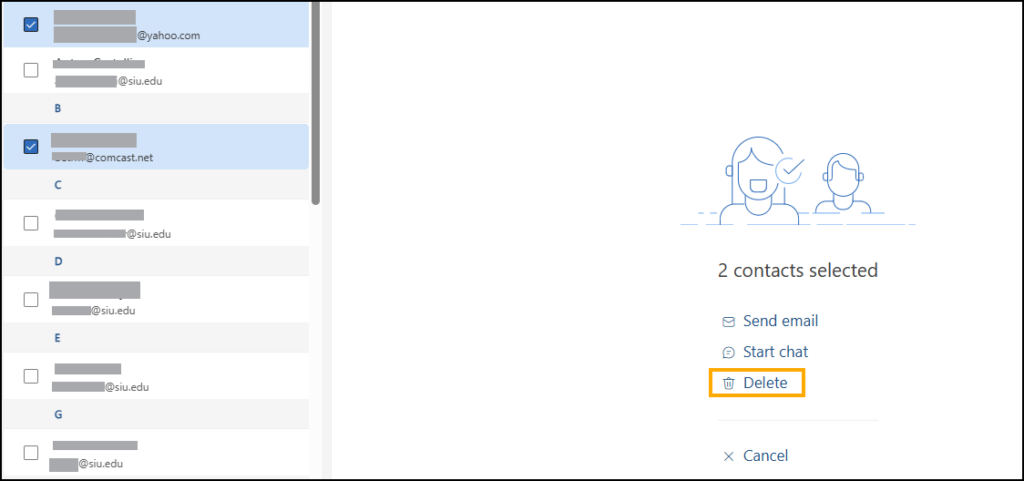
3. Under Your contacts, select the contact you want to delete. To delete multiple contacts at once, select the circle icons next to each contact you want to remove.
4. Select Delete from the middle of your screen.
5. Confirm the deletion when prompted.
The contact is now removed from your Outlook contacts and will no longer appear in your Teams contact list.
Notes
- Deleted contacts are moved to the Deleted folder and may be recoverable for a limited time.
- Contacts in the Global Address List (GAL) cannot be deleted. These are managed centrally by the university.
Still Need Help?
If the contact continues to appear or you’re unsure whether it’s a personal or directory contact, contact SalukiTech for assistance.